
Separate eligibility, assessment and interview decisions
High-volume screening becomes harder to manage when every stage lives in a different spreadsheet with a different status label. Start by mapping the journey from application to interview. Identify the evidence required at each stage and the person who owns the next step.
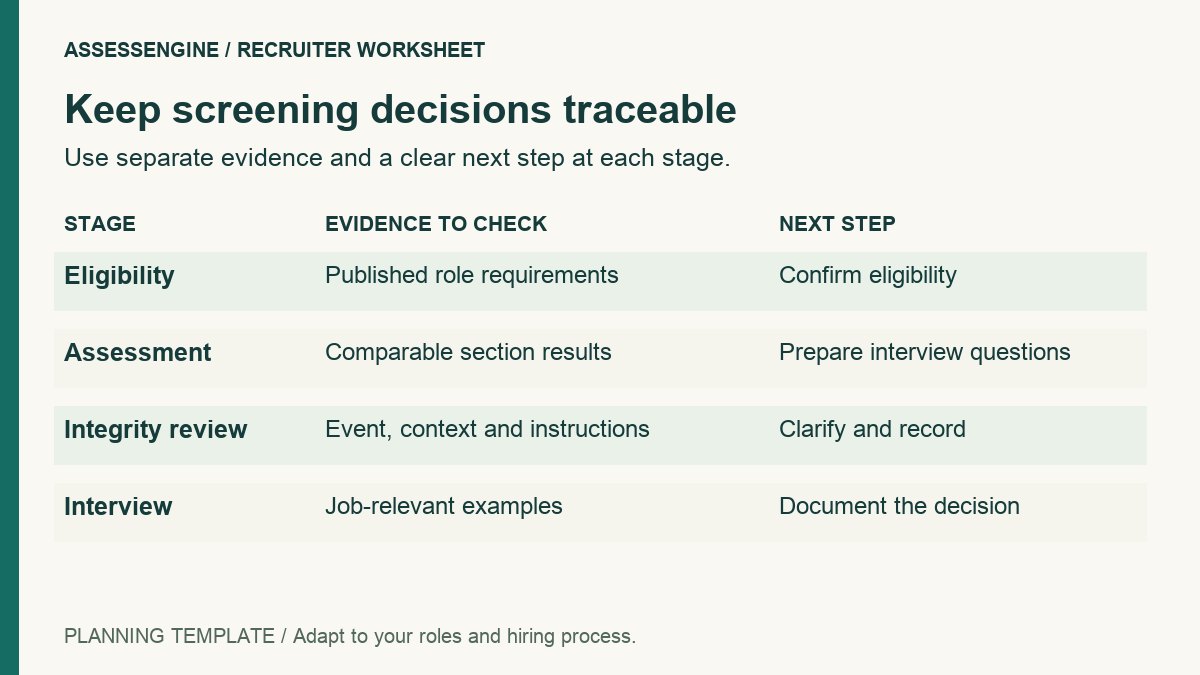
Eligibility checks establish whether an applicant meets stated requirements. An assessment gathers evidence about selected skills or knowledge. An interview examines other relevant capabilities and context. Keeping those purposes distinct helps the team explain why a candidate progressed or why a record needs review.
Plan for volume and review capacity
Use separate counts for invitations, starts, completions, attempts requiring review and interview invitations. An invitation count is not a completion count, and neither tells you how much review work remains.
For illustration only, suppose a drive sends 1,500 invitations, receives 1,200 completed attempts and has interview capacity for 100 candidates. The team still needs a documented process for checking results and exceptions. Those numbers do not justify choosing an arbitrary cut-off or assuming exactly 100 candidates will meet the requirements.
- Estimate candidate volume and the expected test window.
- Allocate people to candidate support and report review.
- Agree on interview capacity and communication ownership.
- Budget time for incomplete attempts, duplicate registrations and permitted rescheduling.
Maintain a consistent candidate record
Use a stable identifier through the assessment and interview process. Before combining exports, check that candidate and attempt identifiers are understood by everyone handling the data. A name alone may not be enough to distinguish records.
Define how duplicate applications and multiple attempts are handled under your process. Keep original attempt records distinguishable from any approved retry. Avoid silently replacing one result with another because a spreadsheet has been sorted differently.
- Candidate identifier and the role or cohort applied for.
- Invitation and attempt status.
- Assessment version and completed section results.
- Exception status, review owner and documented next step.
- Interview invitation and communication status.
Make the candidate instructions easy to follow
Use one clear instruction set for the same assessment setup. Tell candidates when the test opens, how to access it, what device checks are required and how to get help. Explain proctoring requirements before the test if they apply.
Ask the provider to demonstrate the invitation, test start and completed report using the configuration intended for your drive. Confirm which delivery and reporting tasks are supported rather than assuming that every advertised automation will fit your workflow.
Review exceptions separately from ordinary completions
Incomplete attempts and activity flags can disappear inside an otherwise tidy score export. Give them an explicit review status and owner. A proctoring event should be inspected through the agreed process rather than turned into an unexplained score adjustment.
When the assessment window closes, reconcile the candidate list with the completion report. Check missing records and approved retries before creating the interview list. Share only the information interviewers need through your organization’s normal access process.
Create an interview-ready shortlist
Agree on the shortlist rules before results arrive, including who can approve an exception. Review section scores and relevant responses, and keep the reason for each exception traceable. Where candidates took different assessment setups, confirm whether their results can reasonably be compared.
An interview-ready record should show the candidate identifier, relevant assessment evidence, any completed integrity review and the next-stage owner. Include focused interview questions where useful; a total score with no context leaves the interviewer to reconstruct the screening process.
Evaluate the AssessEngine workflow for your drive
AssessEngine describes bulk candidate invitations, browser-based assessments, section results and Excel exports. Its campus hiring workflow also includes assessment-window planning and recruiter review of test activity where enabled.
Bring your estimated volume, assessment sections and support expectations to a demo. Ask to see the actual candidate journey and exported fields. After the drive, review completion and support issues alongside progression to interviews, rather than reporting invitation volume as the only measure of success.
Common questions
What is bulk hiring candidate screening?
It is the coordinated evaluation of a large applicant pool through defined stages before interviews or later hiring decisions. Useful screening combines consistent records, relevant evidence and a documented exception process.
Can assessment scores create the final shortlist automatically?
Scores can support a configured shortlist process, but the team should verify the platform’s actual capabilities and retain responsibility for role criteria, incomplete attempts and exceptions.
Which numbers should recruiters track in a high-volume drive?
Track invitations, starts, completed attempts, review cases, interview invitations and subsequent outcomes separately. Their definitions should remain consistent across cohorts.
What should we ask an assessment provider to demonstrate?
Ask for the candidate invitation and test journey, the relevant scoring configuration, activity evidence where enabled, report exports and support arrangements for the expected volume.
Sources and further reading
Explore AssessEngine
Have a correction or a question? Contact the AssessEngine team and include this article's title.