Create the assessment. Invite candidates. Review the results.
Upload questions in Excel, use the question library, or invite candidates in bulk. Review section scores and export the shortlist. Add web proctoring where the assessment needs it. AssessEngine is a product from Hireclap.
01 · Assessment design
Build the paper for the role.
Choose sections, questions, marks and instructions.
Assessment builder
Sample preview
- MCQ, subjective, psychometric, cognitive and video questions
- Custom sections, names, marks and pass criteria
- Images, special characters and custom formatting
- Custom instructions and company branding
02 · Question library
Use the library or your own questions.
Upload questions in bulk, mix them with the library, and randomise when each candidate should get a different set.
Flexible question setup
- Bulk upload questions through Excel
- Upload objective, subjective and video questions
- Randomise questions from a larger pool
- Add images and role-specific content
03 · Candidate access
Choose how candidates enter.
Share a public link for an open event, or require a username and password, and set when the assessment opens and closes.
Prepare the access and timing instructions with our assessment invitation email templates.
A sample of the screen a candidate sees. Sections, timing and questions can be changed for your role.
Candidate access options
- Set assessment open and close date and time
- Use a public link for open events
- Protect assessments with username and password
- Create branded usernames using your company name, Eg
TCL1258
04 · Proctoring
See what happened during the test.
Webcam photos, tab changes and copy or print attempts are recorded. Your team reviews those events and decides.
Advanced web proctoring
 ID photo captured09:01 · Kavya RClear
 No face in frame09:22 · WebcamReview
 Second face in frame09:28 · WebcamReview
- Webcam image capture during the assessment
- Random image capture during the assessment duration
- Browser movement and switching restrictions
- Copy and print page restrictions
05 · Candidate profile
Collect candidate details before the assessment.
Use the application form to capture them before candidates start.
Dynamic online application form
- Capture graduation, location and other candidate details
- Add custom fields for your hiring process
- Connect application data to assessment results
- Keep candidate information with the scorecard
06 · Results and reporting
See results and shortlist candidates.
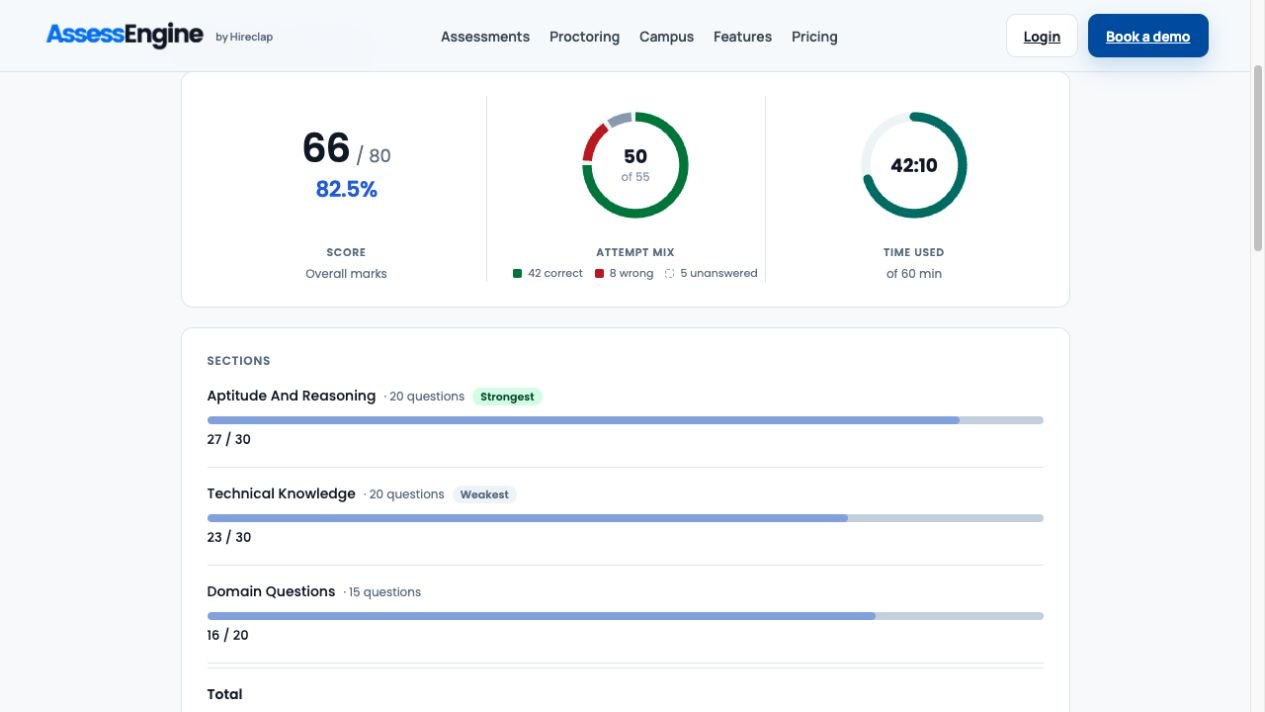
Review the score, see how it splits by section, then export the shortlist.
Live dashboard and reports
- Real-time result dashboard
- Sectional scores and detailed responses
- Pass marks, cut-offs and a message for the candidate after they submit
- Export scorecards to Excel for quick evaluation
Section scores
Kavya’s 66/80, split by section.
Aptitude and reasoning Strongest
27 / 30Logical
16 / 20Technical knowledge Weakest
23 / 30What will recruiters see after an assessment?
Review the total alongside section results, attempt status and responses. Where proctoring is enabled, inspect recorded activity separately from the capability scores.
For a practical review method, read how to interpret a candidate assessment report.
Common questions
What teams ask before getting started.
Can we upload our own assessment questions?
Yes. AssessEngine supports bulk question uploads through Excel. Employers can use their own questions, the available library or a combination. Review the content, answer keys and scoring before launching the assessment.
Can we randomise questions?
Yes. You can keep a larger pool of questions and turn on randomisation, so each candidate gets a different set from that pool.
Can candidates use a mobile or laptop?
Yes. Candidates open the test in a browser on a laptop or phone. No app is installed.
What results can recruiters review and export?
Recruiters can review overall and section scores, detailed responses and assessment status. Results can be exported to Excel for further review and shortlisting. View an illustrative report.
Can we customise assessment sections and scoring?
Yes. Employers can configure sections, question content, marks and pass criteria. Ask for a demonstration using the assessment structure intended for your role.
Can I combine aptitude and technical questions in one assessment?
Yes. Configure sections and questions around the role, with appropriate marks and instructions. An aptitude score and a technical knowledge score answer different questions; review section results rather than assuming the combined total tells the whole story. Compare aptitude and technical assessments.
Ready to assess?
Planning a large assessment drive?
Share the volume, the assessment type, and whether the drive needs proctoring. We’ll show you the simplest setup.
Book a demoEvaluate the workflow
What to check in your assessment-platform demo
- Create and upload representative questions.
- Try candidate invitations and access.
- Check scoring and responses requiring manual review.
- Review report fields and exports.
- Inspect the intended proctoring configuration, where required.
Download the editable evaluation checklist · Read the platform buying guide
See the assessment workflowEvaluate an assessment and its reports
Request 10 free candidate attempts on one standard objective assessment. Once per organisation; activated by the team. Proctoring is excluded.